
Fast Track Estimating
$295.00
The Fast Track Estimating software provides a fast, easy way to produce an accurate estimate and material purchase list.
The Fast Track Estimating software is installed on your Windows-based computer. It’s software you own; it’s not in the cloud so you aren’t renting it, there are no monthly or ongoing payments. Download only, available immediately after purchase to use now (file size: 39mb). More info on downloads here
The Windows-based Fast Track Estimating software provides a fast, easy way to produce an accurate estimate and material purchase list. The heart of this construction estimating software is the list of typical residential construction tasks based on the unit costing model.
Buy any two or more and receive a 20% discount:
Fast Track Estimating Software, Fast Track Proposal Writer software, or the Profitable Estimating Training
The estimating process is simple. Select items from the assembly list to include in the estimate. As assemblies are added, the standard cost for material, labor, subcontractor and other cost is assumed. Each item can be adjusted if desired to reflect a non-standard cost.
Our estimating software is flexible and was designed by a contractor, making it easy to deal with the variety of jobs common in construction.
You can build templates for common jobs, clone existing estimates, adjust assembly prices and markups as needed and enter several different tax codes. When you’re done, a variety of reports are available (see the list below), including Material purchase lists and labor reports. Help screens are available at every step.
The Fast Track Estimating software interfaces with our Fast Track Proposal Writer, making it easier to quickly write a detailed contract for your job.
You can view our videos here, or visit our YouTube channel.
Introduction to Fast Track Estimating
Length: 40 seconds
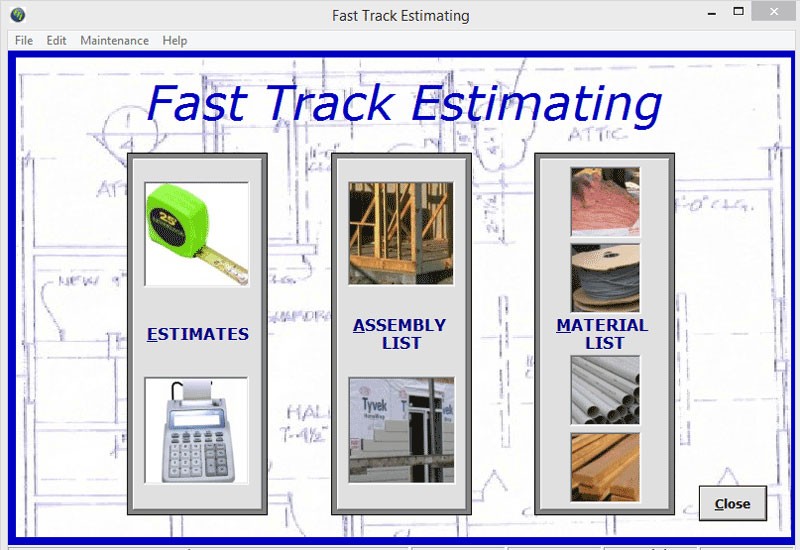
Michael explains the purpose of the three main sections of the Fast Track Estimating Software – Estimates, the Assembly Database and the Material Database.
Creating An Estimate
Length: 6:19 minutes
Michael walks through building a quick 5-item estimate to show how easily an estimate comes together.
Printing Estimates
Length: 2:10 minutes
A quick demo of the printing function for estimates.
Back to Basics – The Material Database
Length: 2:52 minutes
A quick look at the materials in the material database. The search function is also shown.
Adding or Editing Items to the Material Database
Length: 5:03 minutes
Two methods of adding a new material item to the database are demonstrated, along with an inadvertent demo on how to easily edit any material item.
The Material Database – Other Functions
Length: 2:00 minutes
Resequencing the database, updating material costs as a group by a given percent, printing the material database by section or in total.
Overview of the Assembly Database
Length: 2:14 minutes
Michael makes a quick rundown through the assembly database.
Adding, Editing the Assembly Database
Length: 4:22 minutes
Adding items to the assembly database and editing items already in the assembly database. Michael also shows how to add or edit the material items within any given assembly.
Building a Template
Length: 2:38 minutes
It’s easy to create templates that can be used over and over again when building similar-type estimates.
Labor Table
Length: 45 seconds
A quick view of the labor table and how to add/edit labor categories. The labor categories are used in assemblies.
Changing Markup Levels
Length: 32 seconds
A view of the Markup levels available, and how to edit/change any level.
Windows or Mac?
Fast Track Estimating software requires Windows 7 or higher. All the components required will be installed if they aren’t already on your computer. You don’t need Microsoft Excel or Microsoft Access to operate Fast Track Estimating.
To install on a Mac or Apple you’ll need Parallels, a software program that allows you to operate Windows in a separate window on your Mac computer, along with a current Windows operating system. Install Parallels first – then install Windows. Then you can install any of our software programs.
Are demos available?
We don’t offer a demo version, but you can view videos showing how the software works on our YouTube channel.
Are help files available?
Help files are available in the software. You can also review and download the help files here: Download Fast Track Estimating Software Help Files
How does Fast Track Estimating interact with Fast Track Proposal Writer?
After creating an estimate, simply open Fast Track Proposal Writer, select the estimate, and pull in all relevant Work-related contract language for that estimate.
This is how it works. Fast Track Proposal Writer compares the Paragraph Number it finds for each assembly in your estimate with the Paragraph Number in Fast Track Proposal Writer. If it finds a match, the language for that paragraph number is placed in the work section of the contract. You then use the “Edit” function in Fast Track Proposal Writer to provide the specific details for that contract.
What cost categories are used?
Fast Track Estimating identifies four cost categories – material, labor, sub-contractor quotes and other costs. Material cost is the sum of all materials used in that assembly. Labor cost is the product of the time required for that assembly multiplied by the labor rate for the type of work being done. Both sub-contractor quotes and other costs are fixed figure amounts.
Do you offer cost updates?
Automatic updates, adjusted by a percentage to reflect different parts of the country (regional adjustments), may not represent the cost you pay for material at your local yard. For that reason, we believe the best material cost to have in your database is the cost you pay for materials.
Fast Track Estimating ships with most materials already in the database, with a cost for each material. We recommend reviewing the material list and updating the material costs to reflect the costs you see on your invoices. This can be done on a weekly basis, going through that week’s invoices and updated costs as necessary.
Updating the purchase price for your materials is quick and easy, and is immediately reflected in the assemblies using that material. (But any existing estimates won’t be updated until you choose to update them.) If you wish, blanket cost increases can also be made, i.e., increase the cost of all framing materials by a given percentage. Reports are available, allowing you to quickly eyeball the purchase price loaded for material by section.
Similarly, it is easy to update labor costs quickly to reflect your labor rates, and labor cost changes are reflected immediately in assemblies.
How easy is it to add new materials or a new assembly?
Adding new materials or assemblies is extremely easy. The fastest method is by cloning an existing item and making the necessary changes. If you don’t want to clone, it is quick and easy to add new items using a simple form.
How flexible are the labor rates?
The labor table has an unlimited number of labor categories available. If your labor category isn’t listed, add it. If the labor rate shown doesn’t match the rates you pay, change the labor rate. The labor cost in the assemblies using that labor rate is changed immediately.
How well will this work for a specialty contractor?
We have many specialty contractors using our estimating software. The database is primarily focused on remodeling, so there are many assemblies you won’t need. It is very easy to add or modify any additional assemblies you need. It’s extremely flexible and easy to use.
Will this software work in a foreign country?
Yes, but you’ll have to update the material costs and labor rates to your costs. Also, many assemblies are not in metric measurements so you’ll need to convert them, or work in feet and inches. It’s all doable, and once it’s done, the software would work great.
How easy is it to create an estimate?
Simply select assembly items from a table. If you have a previous estimate that is similar, you can copy the previous estimate and make the pertinent changes. There are also a number of basic templates already included (and you can add more) that can be quickly added to any estimate.
How easy is it to change an estimate?
Estimate items can be added or deleted quickly. If you are estimating a job with unique costs, you can easily change the cost of any cost category for that one estimate only. This makes it easy to add sub-contractor quotes to an estimate. A separate markup table allows you to specify the markup for each of the four cost elements (material, labor, sub-contractor quotes and other costs). You can override the markup level for any assembly in an estimate if needed.
What reports are available?
A wide variety of reports are available in Fast Track Estimating. A sample of each report is shown below (reports open in a new window and are in pdf format, requiring the free Adobe Acrobat software to view)
Customer Reports
Price Detail, Sorted by Room Area
Price Summary, Sorted by Room Area
Price, Total with Quantity Detail, Sorted by Room Area
Price, Total Only, Sorted by Room Area
Price Detail, Sorted by Type of Work
Price Summary, Sorted by Type of Work
Price, Total with Quantity Detail, Sorted by Type of Work
Price, Total Only, Sorted by Type of Work
Estimate Reports
Full Cost and Price Detail
Cost Detail, Sorted by Room Area
Cost Summary, Sorted by Room Area
Cost Detail, Sorted by Type of Work
Cost Summary, Sorted by Type of Work
Cost Summary, Sorted by Type of Work with Totals
Material Reports
Detailed Material Purchase List, Sorted by Type of Work
Summary Material Purchase List, Sorted by Type of Work
Material Use Report, Sorted by Material Item
Labor Reports
Detailed Labor Report
Summary Labor Report
If I review an estimate created a year ago, will the price I presented to my client still be shown, or will it have changed because of material cost changes?
The price you saw a year ago will still be the price in the estimate. Estimates are not updated (regardless of changes to assembly, material or labor costs) until you request they be updated.
Updating costs is easy. In the Estimate screen, a “Update/Standard Costs” option will update all standard costs in an estimate to reflect current costs and labor rates. If a standard cost has been overridden (i.e., a sub-contractor quote was added for a specific line item) that cost will not be updated.
The most common support questions are listed below. If your question isn’t answered, please send a note to [email protected], or call 1-360-335-1100.
What file will be downloaded with my purchase?
Fast Track Estimating download is a zipped file named FTESetup.zip
Where do I find help files?
You can view the Help files online here. When you are in Fast Track Estimating, the Help files link is in the top menu on every screen. You can also press F1 to open help.
How does Fast Track Estimating interact with Fast Track Proposal Writer?
After creating an estimate, simply open Fast Track Proposal Writer, select the estimate, and pull in all relevant Work-related contract language for that estimate.
NOTE: If you purchased Fast Track Estimating prior to February of 2011, the database you received had some incorrect Paragraph Numbers in the assemblies. If you use any of these estimate items, you will either add the wrong paragraph language in FTPW, or not add any language to match the item. Click here to see the paragraph numbers that need to be changed in Fast Track Estimating to match your Fast Track Proposal Writer software.
What files are important to backup?
There are two major databases used in the Fast Track Estimating Software. One database stores all Material costs, labor costs, and Assembly data. The second database stores all client information and estimates.
The material and assembly databases are stored in a file named FTED.mdb (or just FTED). Estimates are stored in the file named FTEC.mdb (or just FTEC). When the program is open, you’ll might also see files named FTED.ldb or FTEC.ldb. These files only exist when the program is open, when you exit Fast Track Estimating, the .ldb files will disappear.
Where are these databases located?
It depends on your Windows operating system and whether or not you used the default file location.
In Windows 2000 and XP, the databases are normally located in the C:\Program Files\CPR\Estimating folder.
In Windows Vista and 7, the databases might appear to be located in the C:\Program Files\CPR\Estimating folder, but they aren’t. Microsoft decided to not allow the ability to write data to a file in the Program Files folder, so it places the actual, active files in another location, and makes them hard to find.
They are probably hidden files, so within Windows Explorer you’ll have to go to Tools – Folder Options – View, and select “Show hidden files and folders”. Close Windows Explorer, then reopen it. (In Windows 7, it might be Organize – Folder and Search Options – View, and select “Show hidden files, folders or drives”.)
Windows Secret: To open Windows Explorer quickly, hold down the Windows key located between the CTRL and ALT keys on your keyboard. While holding it down, press the letter E one time.
In both Vista and Windows 7, you should now be able to find both FTEC and FTED in C:\Users\WhateverYourUserNameIs\AppData\Local\VirtualStore\ and from there either in the Program Files (x86) or the Program Data folder. It should be under CPR\Estimating, and you’ll find both FTEC.mdb and FTED.mdb in the same place.
In newer installs of Fast Track Estimating, the default file location is C:\CPR\Estimating.
How do I backup my files?
The only files that need to be backed up are FTEC and FTED. Using the instructions above, find your files (check the “date modified” to make sure you have the correct files) and copy them on a disk or other media in case your computer fails.
If your computer fails, reinstall Fast Track Estimating from the disk, and replace the FTEC and FTED that was installed on the disk with your backed-up FTEC and FTED files.
I’m getting Error 365, “Error Description: Unable to unload within this context at line 45”
The Fast Track Estimating software has issues with 4K monitors. Some users with a 4K monitor at a high resolution see Error 365. The recommendation is to change your screen resolution to 2048 x 1152 while running the software.
A user sent this document showing how to make that adjustment in Windows 11; Windows 10 is similar. For older versions of Windows, you can run the software in compatibility mode. To run in compatibility mode, find the Icon on your desktop and right click. Choose Properties, then select the Compatibility tab. Experiment with which setting works best for your system.
I moved the program to another computer and it doesn’t work
You must do a complete install of the program on your new computer first, from the disk (or using the .exe that was downloaded). After doing the complete install, replace the FTEC and FTED that was installed on the disk with your previous FTEC and FTED files.


Bo Jespersen –
Where to begin….we have used this refreshingly simple but precise software for nearly 15 years. We run a successful company in Central Maine where your numbers must be right to not only survive but also to thrive. This software coupled with the patient help from Devon and Michael, enabled us to do that. While we have looked at other products over the years (costing thousands of dollars), none have been able to replicate the simplicity and detail I can get from Fast Track. I am extremely grateful for this program and cannot recommend it highly enough.
Frank –
I have been using this software for about 10 years now. For the applications we have been using it (all facets in the general contracting and construction field), I couldn’t have asked for a better product. It allows me to estimate the entire project while building it in my head in order of how things are done. And the fact that we can customize any single part of the database is what is most convenient for us. Thank you for a great product.
Kim –
Hallleujah! I needed this-you’re my savior.